Bug report #15094

Labels disappear
| Status: | Closed | ||
|---|---|---|---|
| Priority: | Normal | ||
| Assignee: | - | ||
| Category: | Browser | ||
| Affected QGIS version: | 2.14.0 | Regression?: | No |
| Operating System: | Windows | Easy fix?: | No |
| Pull Request or Patch supplied: | No | Resolution: | wontfix |
| Crashes QGIS or corrupts data: | No | Copied to github as #: | 23036 |
Description
from QGIS 2.14, the labels of two (or more) layers disappears randomically.


History
#1
 Updated by R. R. about 10 years ago
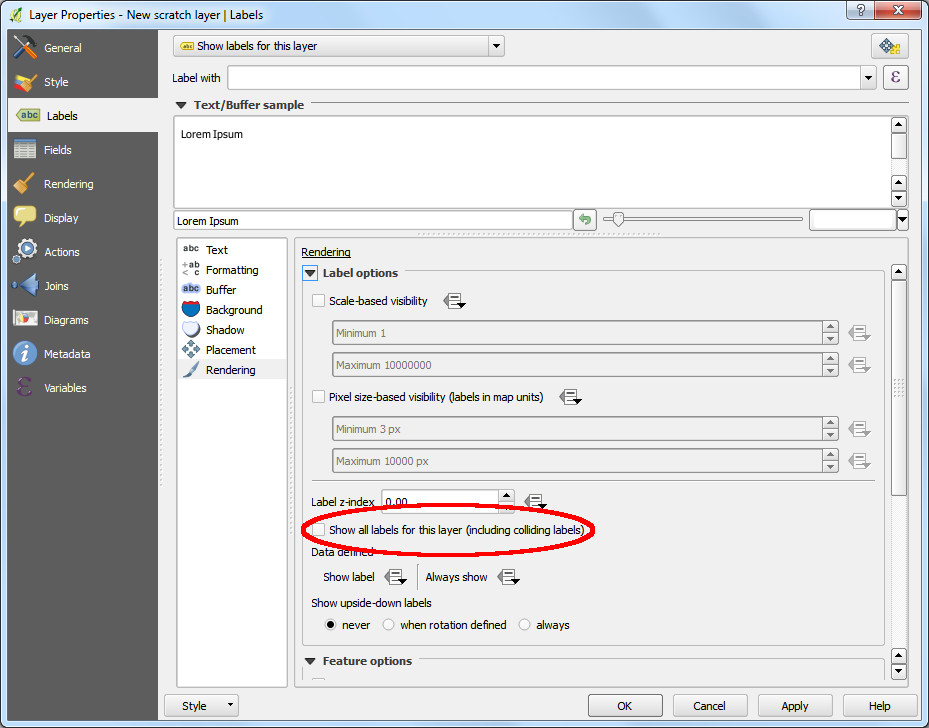
- File layer_properties_labels.jpg added
Hi Roberto, can you please activate 'Show all labels for this layer (including colliding labels)' and try again?
#2
Updated by R. R. about 10 years ago
- File layer_properties_labels.jpg added
#3
 Updated by Roberto BobMaX about 10 years ago
Good, it works !
But, I think this must be the default. :)
#4
 Updated by Matthias Kuhn about 10 years ago
- Resolution set to wontfix
- Status changed from Open to Closed
This is by design.
On dense maps and this option on, the user experience decreases rapidly.
It's best to spread the word about the option itself :)